How Many Types of Meetings?

Wednesday, December 7th, 2011

Although experts frequently suggest that effective PowerPoint presentations should not include “bullet points” or presenters should only be using less then 15 slides – these rules are just guidelines depending on the type of meeting. If you have an hour to persuade an audience of 500 that your Fortune 500 company is a good investment, that is a different type of meeting than if you have 10 minutes to pitch your new startup to a group of angel investors.

The type of meeting is an important factor which helps determine the content, number and type of slides that will help you get the results you need. I thought I’d try and come up with a comprehensive list of types of meetings. Please comment or email me if you can suggest additional types meetings. Here’s my list:

Board Meetings
Brainstorming Meetings
Breakout meetings
Combination meetings
Conference call meetings
Emergency Meetings
Evaluation Meetings
Event Planning Meetings
Feedback Meetings
Financial Review meetings
Financial Update Meetings
First Meetings
Holiday Meetings
Information sharing meetings
Introduction Meetings
Investor meetings
Keynote Speeches
Large Conference meetings
Leadership Meetings
Management Meetings
Manager meetings
Meetings to plan bigger meetings
New Business Pitch meetings
New Product Launch Meetings
Online meetings
Organizational meeting
Party Meetings
Pitch meetings
Planning Meetings
Political Meetings
Problem-solving meetings
Production Meetings
Project Planning Meetings
Religious meetings
Research Review Meetings
Sales meetings
Shareholder Meetings
Small Conference Meetings
Staff Meetings
Stakeholder Meetings
Strategy meetings
Termination Meetings
Training Session Meetings
Trip Planning Meetings
Update meetings
Year End meetings
Year beginning meetings
Family Meetings
School Meetings
Class meetings
Public Relations Meetings
Sports Meetings (and events)
Team Meetings


Birth of a Baby PowerPoint

Friday, November 5th, 2010

An actual email last night at 10:11pm to eSlide:

“Russ, We’ll call you in a few minutes to discuss the edits here.

FYI – I may or may not be heading to the hospital with my wife who is expecting our 2nd child any day now. Please send all of the updates requested going forward to me and Andrew when they are done so that if I’m not here, he’ll get them.”

Then at 11:51pm in response to sending him his requested edits:

“Thanks Russ.  At hospital so I’ll touch be tomorrow.”

We have yet to hear from him this morning if the baby was born or if he has more edits. This is not the first time we’ve received an email from a client in the hospital and probably will not be the last. It is an example of the intensity of some of our clients and how seriously they take their work.

This person is an analyst for the executive team of a major healthcare company. He and his team are preparing presentations for their upcoming yearly analyst meeting. They do not take this opportunity to present to an important group of analysts lightly.

We have been working with their executive team for years and we know they fully take advantage of the power of excellent PowerPoint visuals to connect with their audience, tell their story effectively, and insure the meeting does not just tell of their success but contributes to their future success with excellent communication.

The pressure of an important PowerPoint production sometimes feels like we’re helping  a client give birth to a baby. I’ve always said all the late night productions for me were great practice for the sleepless “baby feeding and diaper changing days”.  Now that my kids are way beyond that stage,

NY Times Article: “Staying Professional in Virtual Meetings”

Tuesday, October 5th, 2010

A good article on meetings in The New York Times: JOBS | September 26, 2010
Career Couch:  Staying Professional in Virtual Meetings
By EILENE ZIMMERMAN

Virtual meetings have become a staple of business life, but personal conduct during a phone or video conference can be different than in face-to-face meetings.

Eilene Zimmerman hits on some important points about staying professional in Virtual Meetings from the perspective of being a participant.  I totally agree that virtual meetings are now a staple of the business world. One key point she left out about virtual meetings . . . you need to pay even more attention to your PowerPoint visuals – that’s if you are using them.  As Eilene points out the visual component of your virtual meeting is important. Read the rest of this entry »

PowerPoint Masters at Microsoft?

Friday, August 6th, 2010

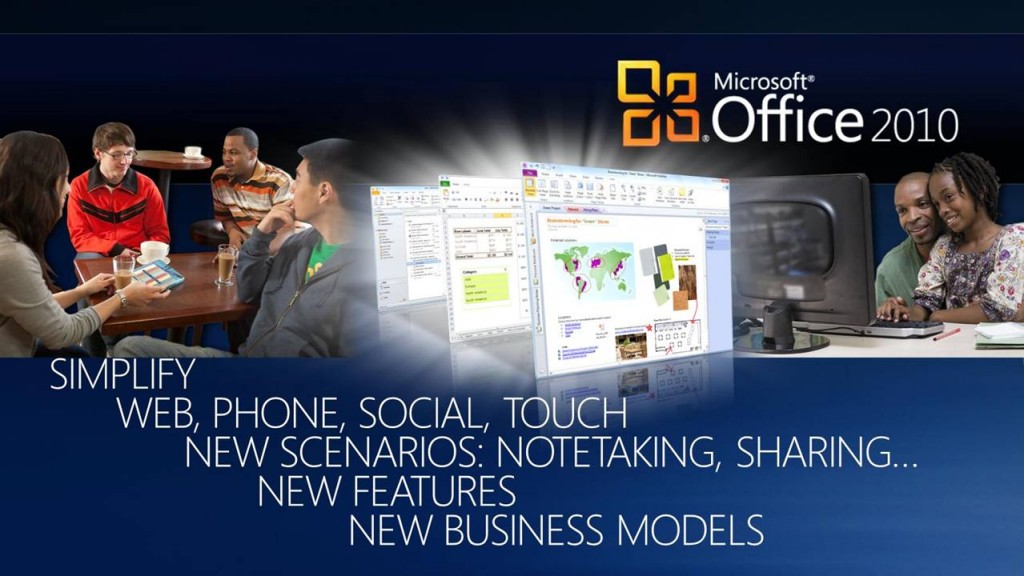
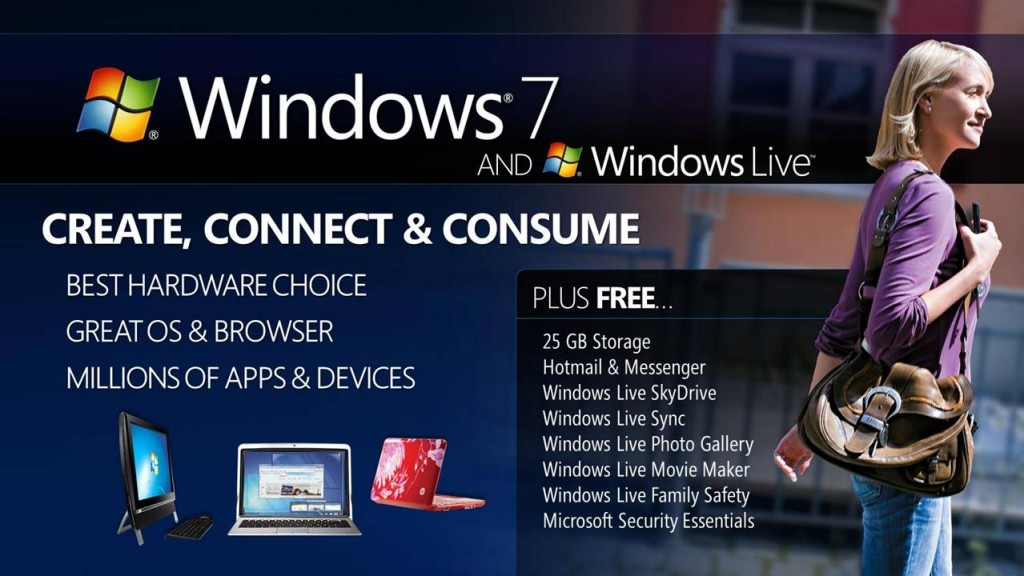
I read that Microsoft had it’s Financial Analyst Meeting yesterday. I was curious what their PowerPoint slides looked like. Here are two slides from Steve Ballmer’s deck. Now, remember I’m a big fan of Microsoft and LOVE PowerPoint. I thought the slides looked OK, but I was disappointed considering they were from the developers of the program. In general there’s too much content on each slide.  Look at the slide below where it seems their main message is about making Office 2010 simple, but the slide looks chaotic. Using all caps for the text is a very poor design choice – research clearly says ALL CAPS is not as readable as upper/lower case.  One of my #1 rules for good slide design is make it as simple and easy to read as possible.

They should hire one of the terrific PowerPoint MVP’s to assist them with some slide design. Or call eSlide.  Do you think Steve Ballmer did these slides himself? Maybe, I’m being too hard on Steve and Co. What do you think of the design of these two slides?

Click here to see Steve’s entire slide deck and others presented at the their investor conference July 29th, 2010.

Ballmer_FAM_2010 slide1

Ballmer_FAM_2010 slide2